


About this Layout
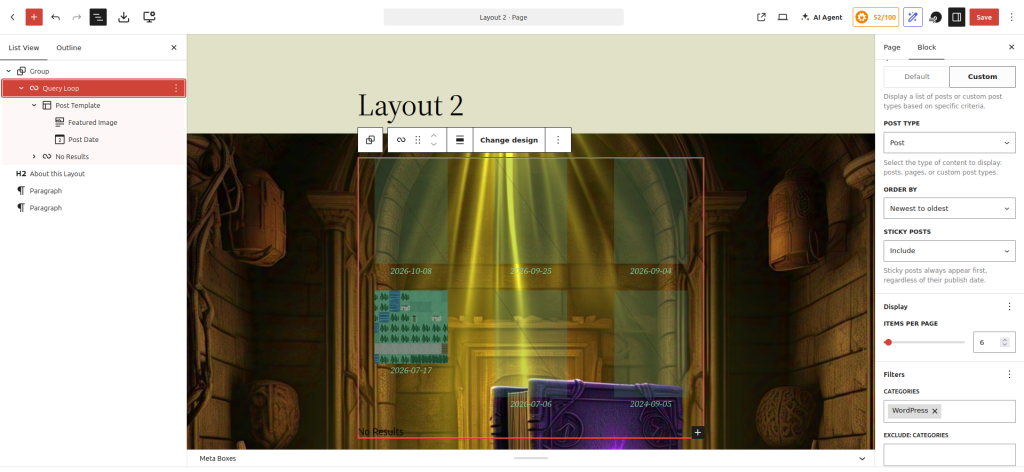
This demonstrates how to use the Group block to create a layout that extends to the full width of the page.
Most of the blocks don’t include the full range of possible layout features. To create more elaborate layouts, the Group block has additional CSS layout controls: background image, full width, drop shadow, and more.
Here’s the WP Code for this layout.
<!-- wp:group {"align":"full","style":{"background":{"backgroundImage":{"url":"https://riceball.com/wp-content/uploads/sites/2/2025/04/a_stack_of_dozens_of_bare_cd.jpeg","id":15338,"source":"file","title":"a_stack_of_dozens_of_bare_cd"},"backgroundSize":"cover"},"spacing":{"padding":{"top":"var:preset|spacing|40","bottom":"var:preset|spacing|80","left":"var:preset|spacing|50","right":"var:preset|spacing|50"},"blockGap":"0","margin":{"top":"0","bottom":"0"}},"shadow":"6px 6px 9px rgba(0, 0, 0, 0.2)","position":{"type":""}},"layout":{"type":"constrained"}} -->
<div class="wp-block-group alignfull" style="margin-top:0;margin-bottom:0;padding-top:var(--wp--preset--spacing--40);padding-right:var(--wp--preset--spacing--50);padding-bottom:var(--wp--preset--spacing--80);padding-left:var(--wp--preset--spacing--50);box-shadow:6px 6px 9px rgba(0, 0, 0, 0.2)"><!-- wp:query {"queryId":0,"query":{"perPage":6,"pages":0,"offset":0,"postType":"post","order":"desc","orderBy":"date","author":"","search":"","exclude":[],"sticky":"","inherit":false,"taxQuery":{"include":{"category":[148]}},"parents":[],"format":[],"excludeCurrent":null}} -->
<div class="wp-block-query"><!-- wp:post-template {"layout":{"type":"grid","columnCount":3}} -->
<!-- wp:post-featured-image {"isLink":true,"aspectRatio":"1","overlayColor":"light-green-cyan","dimRatio":20,"style":{"spacing":{"margin":{"right":"var:preset|spacing|30","left":"var:preset|spacing|30","top":"0","bottom":"0"}}}} /-->

<!-- wp:post-date {"format":"Y-m-d","isLink":true,"metadata":{"bindings":{"datetime":{"source":"core/post-data","args":{"field":"date"}}}},"style":{"spacing":{"margin":{"right":"var:preset|spacing|30","left":"var:preset|spacing|30","top":"0","bottom":"0"},"padding":{"top":"0","bottom":"0"}},"elements":{"link":{"color":{"text":"var:preset|color|light-green-cyan"}}},"typography":{"textAlign":"center"}},"textColor":"light-green-cyan"} /-->
<!-- /wp:post-template -->

<!-- wp:query-no-results -->
<!-- wp:paragraph {"placeholder":"Add text or blocks that will display when a query returns no results."} -->
<p>No Results</p>
<!-- /wp:paragraph -->
<!-- /wp:query-no-results --></div>
<!-- /wp:query --></div>
<!-- /wp:group -->

<!-- wp:heading -->
<h2 class="wp-block-heading">About this Layout</h2>
<!-- /wp:heading -->

<!-- wp:paragraph -->
<p>This demonstrates how to use the Group block to create a layout that extends to the full width of the page.</p>
<!-- /wp:paragraph -->

<!-- wp:paragraph -->
<p>Most of the blocks don't include the full range of possible layout features. To create more elaborate layouts, the Group block has additional CSS layout controls: background image, full width, drop shadow, and more.</p>
<!-- /wp:paragraph -->

<!-- wp:paragraph -->
<p></p>
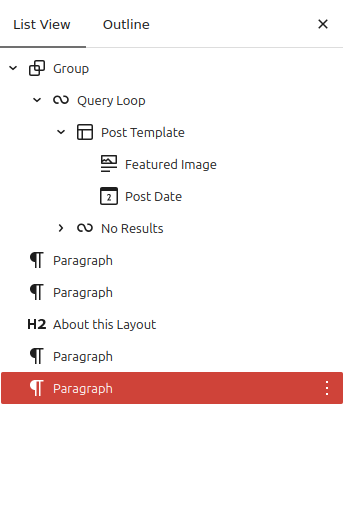
<!-- /wp:paragraph -->Here’s a screenshot of the page’s block hierarchy:
Here’s a screenshot of the WP editor with this layout:
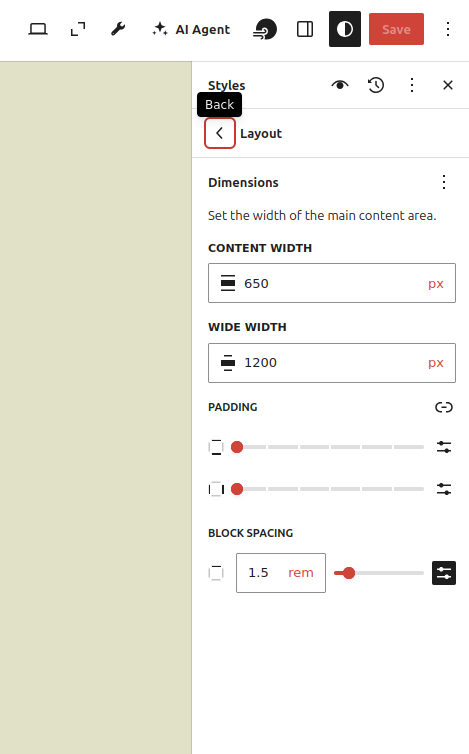
Getting rid of whitespace at the top of the layout required going to “Edit Site” to edit the template, and, from there, editing the global styles (the half-moon icon), then Layout.
Here’s a screenshot of the global style layout editor: