Hot Links, a bloggy alternative to X and others. More info at the bottom of the page.
Also on: Bsky.
-

Getting into Asian cinema made me realize how rarely Western film lets us just be human : r/asianamerican
Some good lists of movies to watch!
-
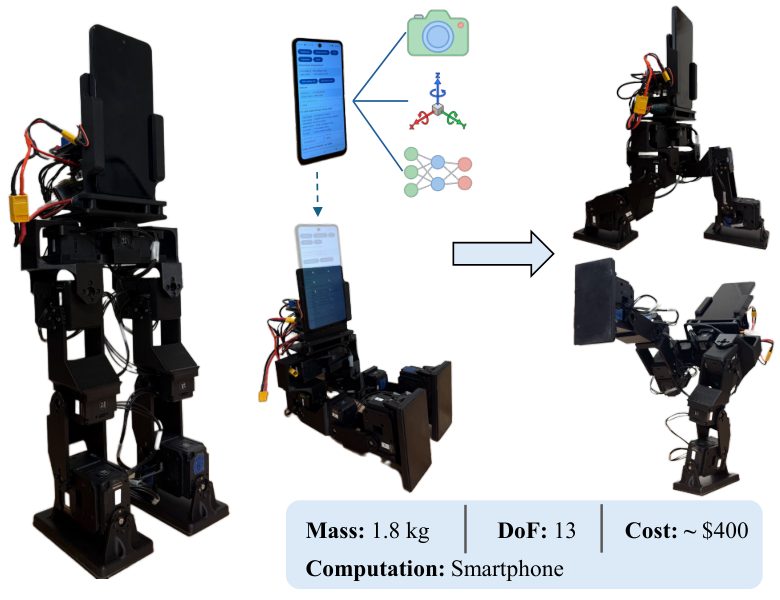
PhoneBot, a phone that controls a bot that walks
-

Self-driving Tesla hits and kills 71-year-old pedestrian on California freeway
A man walked into the path of a Tesla on Interstate 80 in Vallejo and died from his injuries, California Highway Patrol said.
Source: Self-driving Tesla hits and kills 71-year-old pedestrian on California freeway
More About Hot Links
RSS feed URL: http://riceball.com/category/hot-links/feed
This is a WordPress centered way to create a category of posts to create a microblogging/tweeting area on any regular WP site.
- Create a Category named “Hot Links”.
- Make a Page called “Hot Links”, and in it, put a Query Loop block, and have it filter for the Hot Links category. Adjust the layout to show the entire content of the post, and the Featured Image, and Title (and maybe Author). Remove the Excerpt. Add a header note, and a footer note (like this one).
- Install the Press This plugin. This helps with sharing a web pages link to your site. It’s located in the Admin Dashboard under Tools -> Available Tools. This is already installed on WordPress.com free sites.
- (Optional) Install the Pretty RSS Feeds plugin to get the human-readable layout for RSS feed URLs.
- Add a link to the Hot Links page from another page on your site, for SEO.
- Add links out from the Hot Links page to social media or other sites.
- Develop a routine to use Press This to share the link, and then repost to your social media. (You can share the original link.)
Why bother?
Why bother to post on your own blog? Because social media deprioritizes/shadow-bans some news posts. They don’t get sent to followers. You get a smaller group of non-subscribers in your views and liks.
Combined with aggregator pages, RSS feeds and microblogging can rebuild networks of link sharing that were taken over by “social media” in the mid 2000s.